Saturday, February 25, 2023

Operations on Python Dictionaries

 In previous chapter "python Dictionaries" we have detailed  how to create a python dictionary and insert an element to python dictionary. In this chapter we will look into more operations on python dictionaries. Here we will be using the dictionaries created in previous chapter to demonstrate different operations. Two dictionaries created in previous chapter are as below


Accessing keys and values: 


Accessing Individual Elements:

Dictionary elements are key value pairs, dictionary individual elements are accessed using the keys


Deleting/Removing Dictionary Elements:

Deleting/Removing of elements from dictionary is done using the del keyword. del deletes the key value pair from the dictionary. Dictionary element to be deleted is accessed using the key

eg: del dict[key] 

Element 10 is deleted from the dictionary using the del keyword. Dictionary elements are shown prior and after deletion of element 10.

pop on Dictionary Element:

pop deletes key value pair from dictionary and returns the value of the deleted element. Dictionary element to pop is accessed using the key.

eg: dict.pop(key)

In above example element A is popped from dict2 and value of A is returned after pop operation

update on Dictionary Element:

update keyword inserts a new element if key is not present in the element list. value of key is updated when element exists in the dictionary. Dictionary does not support duplicate keys.

eg: dict.update({key:value})


Renaming Dictionary Key:

To achieve this functionality, use pop operation which deletes the element and returns value of that key. Using the value returned during pop operation, insert a new element to dictionary.


Python dictionaries

Here we will be discussing an important python data type dict. Python dict is an unordered collection of items. Each dictionary item holds a key:value pair, python dictionaries are optimized to retrieve values when key is known.
In python, an empty dictionary is defined using empty curly braces {}.

Inserting an Element to Python Dictionary:
Length of dictionary is 0 zero, dictionary do not contain any element and its empty. We will see how we can add elements to an empty dictionary.

Elements can also be added during the initialization of dictionary itself. Let us see an example 

Dictionary created above has strings in both keys and values. It can also contain mixed data types. Python Dictionary is a heterogenous.

In the next chapter operations on Python Dictionaries we will discuss different operations on dictionary like accessing elements, updating elements, removing elements, Listing all the keys  

Wednesday, February 22, 2023

Python Program Convert Text to Speech

In this article we will see how to convert text to speech in python and the libraries required by python program to enable this functionality.

Lets start with Offline Text to Speech conversion, to achieve this install pyttsx3 library using the command pip install pyttsx3

import pyttsx3

Initialize the Text to Speech library by invoking init function

TXT2SPCH_ENGINE =  pyttsx3.init()

text = "Python programming makes coding simple"

TXT2SPCH_ENGINE.say(text)

To play the converted speech

TXT2SPCH_ENGINE.runAndWait()

This library also provides different properties that can be set on the speech like rate (speed of voice), voice (different types of voices), save_to_file (save speech to a file).

rate = TXT2SPCH_ENGINE.getProperty("rate")

print(rate)

Default rate is 200. Setting any value above 200 sets the voice to a faster rate and value below 200 sets the voice to a slower rate.

faster rate:

TXT2SPCH_ENGINE.setProperty("rate", 300)

slower rate:

TXT2SPCH_ENGINE.setProperty("rate", 100)

Fetch the details of all voices available in the library

voices = TXT2SPCH_ENGINE.getProperty("voices") 

Set a new voice to the speech engine

TXT2SPCH_ENGINE.setProperty("voice", voices[1].id)

Saving Speech to file

TXT2SPCH_ENGINE.save_to_file(text, "audioSpeech.mp3")

A sample program with complete details is available at GitHub The program reads the input from a file and converts the text to speech.

Saturday, February 18, 2023

Python Program to fetch Live Stock Data from NSE

To process live data from NSE using python we need two libraries nsepy and nsetools. We can extract all the details like Last Traded price, Total Traded Quantity, Delivery Quantity, Upper Price Band and all other values on real time basis for a particular stock from NSE. In the below example we have shown an example to fetch last traded price and close price. 

In the next program we will use this data to evaluate technical indicator values.


import os

os.system('pip install nsepy')

os.system('pip install nsetools')


import pandas as pd


from nsepy.live import get_holidays_list

from datetime import date, timedelta


from nsetools import Nse

import nsepy as NSE


nse = Nse()


all_stock_codes = nse.get_stock_codes()

symbols = all_stock_codes.keys()

series = "EQ"

for data_symbol in symbols:

    tradingSymbol = data_symbol

    series = "EQ"

    quote = NSE.live.get_quote(symbol=tradingSymbol)

    stock_data = quote["data"]

    #print(pd.DataFrame(quote["data"]).T)

    if(len(stock_data) == 0):

      continue

    Close_Price = stock_data[0]["closePrice"]

    Last_Price = stock_data[0]["lastPrice"]

    print('symbol: {}, LastPrice: {}, ClosePrice: {}'.format(tradingSymbol, Last_Price, Close_Price))


Source Code can be downloaded from GitHub

Friday, February 17, 2023

Python Program to fetch historical Stock Data from NSE

To fetch historical data from NSE using python we need two libraries nsepy and nsetools.End date is set as current date and start date is set to a value for the period that is decided to fetch the historical data. Here we fetch the historical data for a period of 365 days. In the next program we will use this data to evaluate technical indicator values.


import os

os.system('pip install nsepy')

os.system('pip install nsetools')


import pandas as pd

from nsepy import get_history as gh

import dateutil.relativedelta as dr

import math

from nsepy.live import get_holidays_list

from datetime import date, timedelta

from nsetools import Nse

nse = Nse()


all_stock_codes = nse.get_stock_codes()

symbols = all_stock_codes.keys()

dt_today = date.today()

series = "EQ"


for data_symbol in symbols:

    tradingSymbol = data_symbol

    endDate = dt_today

    startDate = endDate - dr.relativedelta(days=365)

    series = "EQ"

    stockData_EQ = pd.DataFrame()

    stockData_EQ = gh(symbol=tradingSymbol, start=startDate, end=endDate,index=False, futures=False, option_type="",

                expiry_date=None, strike_price="",series='EQ')

    print(stockData_EQ)


program can be downloaded from GitHub

AES Encryption and Decryption using OpenSSL in CPP

#include <iostream>

using namespace std;

#include <string>

#include <openssl/evp.h>

#include <openssl/objects.h>


/*

* Define your own KEY for Encryption and Decryption of Data

*/

static const unsigned char DCPKey[] = {0xC2,0x3B,0x73,0xCC,0xF0,0x2E,0x4D,0xBA,

0xAF,0xDE,0x73,0x54,0x90,0xCD,0xAB,0xEF,

0xA1,0xC8,0x02,0x3A,0xFC,0x40,0xA8,0xB4,

0xB4,0x70,0x0A,0x3E,0xCA,0xA7,0x04,0xE3};


string AES_Decrypt(string ENCstr)

{

EVP_CIPHER_CTX *ctx = EVP_CIPHER_CTX_new();

EVP_CIPHER_CTX_init(ctx);

EVP_CIPHER_CTX_set_padding(ctx, 0);

int ret = EVP_DecryptInit_ex(ctx, EVP_aes_256_cfb(), NULL, DCPKey, NULL);

    unsigned char* result = new unsigned char[ENCstr.length()]; // Make a big enough space

    int *len1 = new int();;

    ret = EVP_DecryptUpdate(ctx, result, len1, (const unsigned char*)ENCstr.data(), ENCstr.length());

    int *len2 = new int();

    ret = EVP_DecryptFinal_ex(ctx, result+ *len1, len2); 

    ret = EVP_CIPHER_CTX_cleanup(ctx);

    string res((char*)result, *len1+ *len2);

    delete[] result;

delete len1;

delete len2;

EVP_CIPHER_CTX_free(ctx);


    return res;

}


string AES_Encrypt(const std::string source)

{

EVP_CIPHER_CTX *ctx = EVP_CIPHER_CTX_new();

EVP_CIPHER_CTX_init(ctx);


    int ret = EVP_EncryptInit_ex(ctx, EVP_aes_256_cfb(), NULL, DCPKey, NULL);

EVP_CIPHER_CTX_set_padding(ctx, 0);

    unsigned char* result = new unsigned char[source.length() + 64]; // Make a big enough space

    int *len1 = new int();

    ret = EVP_EncryptUpdate(ctx, result, len1, (const unsigned char*)source.data(), source.length());

    int *len2 = new int();

    ret = EVP_EncryptFinal_ex(ctx, result+*len1, len2); 

    ret = EVP_CIPHER_CTX_cleanup(ctx);

    std::string res((char*)result, *len1 + *len2);

    delete[] result;

delete len1;

delete len2;

EVP_CIPHER_CTX_free(ctx);

    return res;

}


int main(int argc, char* argv[])

{

cout << "AES Encryption Decryption in progress.. Keep Waiting" << endl;


char buf[1024*100];

    FILE* ifp = fopen("input.txt", "rb");

  int bytes = fread(buf, 1, 1024*100, ifp);

  fclose(ifp);

std::string source(buf, bytes); // binary data


string Encrypted_Data = AES_Encrypt (source);

//cout << "Encrypted Data: " << Encrypted_Data << endl;

FILE* efp =  fopen("encrypted.txt", "wb");

  fwrite(Encrypted_Data.data(), 1, Encrypted_Data.length(), efp);

fclose(efp);


string Decrypted_Data = AES_Decrypt (Encrypted_Data);

FILE* dfp =  fopen("output.txt", "wb");

  fwrite(Decrypted_Data.data(), 1, Decrypted_Data.length(), dfp);

fclose(dfp);

return 0;

}

Compilation:
g++ -o aes AES.cpp -lssl -lcrypto
./aes

input.txt -- Source data to encrypt
encrypted.txt -- Encrypted Source Data after processing
output.txt -- Decrypted Data

sample contents of input.txt
[openssl]
CPP program to encrypt data using openSSL library
Also decrypt the same using openSSL library
Using builtin cipher Algorithm present in OpenSSL

Code can be accessed from GitHub

Sunday, October 25, 2020

Conditional Statements in Python

Python programs contains statements that are executed sequentially. Let us understand the usage of conditional statements using an example: Allow booking of tickets to a show only when booked ticket count is less than the seating capacity available for the show. When seating capacity is filled completely display a message "No more Booking allowed". One such conditional statement in python is if.
Now let us write a program to do this:

Source code can be downloaded from GitHub
import sys
'''
    Program to demonstrate conditional statements in python
    Conditional statements in python if else
'''

def BookTickets():
    '''
        Reads Seating  Capacity and ticket Count as command
        line arguments.
        Using if and else condition to control the program flow
    '''
    try:
        SeatingCapacity = int(sys.argv[1])
        TicketCount = int(sys.argv[2])
        if ((SeatingCapacity - TicketCount) >= 0 ):
            print('Seats Available for Booking.. ', SeatingCapacity)
        else:
            print('No More Booking Allowed')
        
    except Exception as error:
        print(error)
    

if (len(sys.argv) < 3):
    print('Program Takes 2 arguments Seating Capacity and Ticket Count')
    exit(0)

BookTickets()


elif clause in python

In the above program we have used if else that is execute statements in if block on expression becoming true or statements in else block are executed. Always the control flow is either if or else. Now to add more control flow in the program we can use elif block.

Source code can be downloaded from GitHub

import sys

x = sys.argv[1]

if (x == 0):
    print('Ground floor')
if (x == 1):
    print("1st floor")
elif (x == 2):
    print ("2nd floor")
elif (x == 3):
    print ("3rd floor")
elif (x == 4):
    print ("4th floor")
elif (x == 5):
    print ("5th floor")
else:
    print ('Roof Top reached' )
  

Here we determine the floor in the building that we are currently based on value of x that is passed as an argument to the program.
Any value that is greater than 5 is passed always executes the else block determining roof top is reached.
Execute the code in elif block when all conditions above the elif are not satisfied. 

finally keyword in python

finally block is always executed in python irrespective of exception is raised or not within the program. Exception handling in python can be referred under chapter Python Exception Handling
In finally block we can handle closing of any open connections, files after the exception has been raised in the program or any additional steps to be performed prior to exiting the program.

Copy the below code into file expfinally.py and execute it or copy the code from GitHub

'''
    Module demonstrates exception Handling 
    and finally keyword
'''

def ConvertToInteger(x):
    ''' ConvertToInteger function 
        Converts passed argument to Integer
        Args:
            Takes an argument and converts to Integer
        Return:
            Returns an integer number.
            In case of Exception error code -1 is returned
    '''

    try:
        num = int(x)
    except:
        errCode = -1
        return errCode
    finally:
        print("finally block executed always with or without exception")
    return num


def CountWordsInfile(file):
    ''' CountWordsInfile function 
        Counts the total number of words in file
        Args:
            Takes a single argument fileName 
        Return:
            Return the number of words in the file
    '''

    try:
        fp = open(file, mode='rt', encoding='utf-8')
        data = fp.read()
        words = data.split()
        fp.close()
        print ("words in text file: ",len(words))
        return len(words)
    except Exception as error:
        print("Exception Occured and Exception is:")
        print(error)
    finally:
        print("finally block executed always with or without exception")

For details on docstrings how to use help on module refer to chapter Docstrings and Comments in Python

We have used help on module to refer to the functions inside the module. Demonstrated finally keyword in case of exception and without exception.

expfinally.ConvertToInteger('a') error code of -1 is returned in case of exception and finally block is also executed.

expfinally.ConvertToInteger('29') a valid number is returned after conversion without exception and finally block is also executed.

Python Exception Handling

Exception break normal control flow of the program and terminate the program if not handled. Exceptions are errors raised during execution of program. Python generates exception for errors that are raised and can be handled using exception handling. Exception cause program to crash if not handled and prints the stack trace where and why exception has occurred.
Python uses try and except to handle exceptions within the program. The code or the operation that has possibility of raising an exception is written within the try block and the code to handle the exception raised in try block is written in except block.
For all below demonstration code can be downloaded from GitHub

At the REPL type the below commands to the get the current working directory,
import os
os.getcwd()  #This command will display the current working directory

Let us copy the below code to a file exception.py  and place the file in python current working directory to demonstrate exception handling.

''' Module Converts passed argument to Integer'''
def ConvertToInteger(x):
    num = int(x)
    return num

Now let us import the module exception.py in python REPL and see different exceptions raised.
When passed integer to our conversion function converted successfully. When we passed a character python raised 'ValueError' exception. After the exception program exited immediately.

Handling of Exceptions

Now we will see how to handle exception and ensure the program termination is smooth.
Lets update our current program to handle the exception in our code using try and except block.

''' Module Converts passed argument to Integer
    Args:
        Takes an argument and converts to Integer
    Return:
        Returns an integer number.
        In case of Exception error code -1 is returned
'''
def ConvertToInteger(x):
    try:
        num = int(x)
    except:
        errCode = -1
        return errCode
    return num

Let us run the program for the same input passed earlier and validate the output.


We have enclosed the code num = int(x)  raising exception in try and except block. When a character string is passed and cannot convert, python raised an exception and its handled in except block with error code -1.

Indentation Error, Syntax Error, Name Error are caused by programmer error these have to be fixed by programmer rather than at runtime of program.

Details of Exception Handled:
An exception has been raised and its handled, however we do not know the details of exception that is raised, let us print the details that caused the exception within our code.
We will read the file count the words in file to demonstrate exception details:

def CountWordsInfile(file):
    ''' CountWordsInfile function 
        Counts the total number of words in file
        Args:
            Takes a single argument fileName 
        Return:
            Return the number of words in the file
    '''

    try:
        fp = open(file, mode='rt', encoding='utf-8')
        data = fp.read()
        words = data.split()
        fp.close()
        print ("words in text file: ",len(words))
        return len(words)
    except Exception as error:
        print("Exception Occured and Exception is:")
        print(error)

Lets import the function CountWordsInfile from module exception and pass a random file that does not exist on the machine. Python prints the exception details.
Also let us pass a file that exists and see the output that prints the number of words in the file.

Code can be downloaded from GitHub
For file reading and writing files refer Python Reading Files


pass keyword in python

Python programming do not allow empty block of code within a program. pass is a syntactical requirement of python programming to write future code. Empty block of code is not allowed in loops, function definitions, conditional statements, class definitions.
Let us try few examples with empty block of code and introduce pass later.

Copy the below code into a program called pass.py and execute it. printData function do not have any statements.

def printData():

    
def main():
    printData()

if (__name__ == '__main__'):
    main()


Execution of the program is showing indentation error at function main. Now let us introduce pass in printData function and re-execute the program.


def printData():
    pass
    
def main():
    printData()

if (__name__ == '__main__'):
    main()


After introducing pass keyword program executed without any errors. Similarly empty blocks are not allowed for loops, function definitions, conditional statements, class definitions.

Code can be downloaded from GitHub

While Loop in Python

Loops are used in programming language to perform a particular task repetitively until a condition is met. In this chapter we will cover while loop in  python. syntax of while loop in python programming

while expression:
    Loop Statements
While loop starts with while keyword and expression (condition for while) followed by a colon representing a new block of while. Statements in the loop are executed repetitively until the expression is evaluated to false.

paste the below code into a file while_loop.py and execute the code

import sys

'''
    Program to demonstrate while loop 
    Reads a string and prints each word.    
'''
def printWords(string):
    '''
        print Words function reads the strings, splits on space
        loops through the words and prints the words
        
        Args:
            Takes a string as a input
        Returns:
            no return
    '''
    wordList = string.split()
    wordCount = len(wordList)
    k = 0
    while(k < wordCount):
        print(wordList[k])
        k += 1


if (__name__ == '__main__'):
    if(len(sys.argv) < 2):
        print('Provide string as an argument')
        exit(0)
    inpStr = sys.argv[1]
    printWords(inpStr)
 
Alternatively code can be downloaded from GitHub

Here we are passing a command line argument to the program while_loop.py . The program parses the argument string splits and prints words to the console using while loop.

Let us see one more simple program using while loop with continue and break.
continue: skips the current iteration and continues with the next one.

i=0
while (i<=10):
    i += 1
    if (i%2 == 0):
        continue
    print(i)


break: stops the loop at the current iteration and exits the loop.

i=0
while (i<10):
    i += 1
    if (i == 5):
        break
    print(i)


loop starts evaluating the statements inside the loop, Immediately after break statement the control comes out of the loop and loop stops executing.

for loop in python

Loops are used in programming language to perform a particular task repetitively until a condition is met. In this chapter we will cover for loop in  python. syntax of for loop in python programming

for data in sequence:
    Loop Statements
for loop starts with while keyword and data in sequence followed by a colon representing a new block of for. Statements in the loop are executed repetitively until the data is available in sequence.

paste the below code into a file for_loop.py and execute the code. Code referred will be same as while chapter, difference will be using for loop in place of while loop.

import sys

'''
    Program to demonstrate while loop 
    Reads a string and prints each word.    
'''
def printWords(string):
    '''
        print Words function reads the strings, splits on space
        loops through the words and prints the words
        
        Args:
            Takes a string as a input
        Returns:
            no return
    '''
    wordList = string.split()
    for word in wordList :
        print(word)
        

if (__name__ == '__main__'):
    if(len(sys.argv) < 2):
        print('Provide string as an argument')
        exit(0)
    inpStr = sys.argv[1]
    printWords(inpStr)


Output produced by while and for loop are same. Refer to usage of while loop in python.

Code snippet of for loop from GitHub

what is __name__

Python has a special builtin variables which are delimited by double under scores. These variables are evaluated at runtime of python program. We will discuss one such variable here that is __name__ . This variable produces different outputs when module is imported  vs when module is executed directly. This is an important feature of python helps writing the module functionality accordingly.

Here we will be reusing the code written in our Module chapter. Reusing this to demonstrate the functionality.

Paste the code into below module words_name.py


'''
    Module to read a text file and convert each word 
    first letter to CAPS.
'''

def readfile(fileName):
    '''
       Reads input file passed as an agrument process the data
       and prints capitalized words to console.
       Args:
            Takes fileName as an argument
    '''
    fp = open(fileName, mode='rt', encoding='utf-8')
    words = fp.read().split()
    newWords = convertToCaps(words)
    print('Words in Capitalized form')
    for word in newWords:
        print (word)
    fp.close()
    

def convertToCaps(wordsList):
    '''
       Reads input fila passed as an agrument process the data
       and prints capitalized words to console.
       Args:
            Takes wordsList as an argument
       Returns:
            returns wordsList with capitalized letter in each word
    '''
    capitalizedWords = []
    for word in wordsList:
        capitalizedWords.append(word.capitalize())
    return capitalizedWords
    
    
print(__name__) # Using the double under score variable

In the last line of above code we are outputting the value of __name__ variable.

Importing the Module
Here we imported the module, output of the __name__ variable is evaluated to module name words_name. 

Executing the Module
We executed the module, output of the __name__ variable is evaluated to __main__

Let use this important feature of detection of import vs execution to program our module words_name

Code in the file words_name.py is updated to read file as an argument and process the data in the file when the module is executed. Special variable __name__ is used to determine the execution and corresponding functions to process the data are called.
Code is not executed when the module is imported as the flow does not evaluate special __name__ to __main__

Paste the below code into words_name module or copy the code from GitHub

import sys

'''
    Module to read a text file and convert each word 
    first letter to CAPS.
    
    Execution of module takes a single argument that is 
    file to read and convert.
'''

def readfile(fileName):
    '''
       Reads input file passed as an agrument process the data
       and prints capitalized words to console.
       Args:
            Takes fileName as an argument
    '''
    try:
        fp = open(fileName, mode='rt', encoding='utf-8')
        words = fp.read().split()
        newWords = convertToCaps(words)
        print('Words in Capitalized form')
        for word in newWords:
            print (word)
        fp.close()
    except Excpetion as error:
        print(error)

def convertToCaps(wordsList):
    '''
       Reads input fila passed as an agrument process the data
       and prints capitalized words to console.
       Args:
            Takes wordsList as an argument
       Returns:
            returns wordsList with capitalized letter in each word
    '''
    capitalizedWords = []
    for word in wordsList:
        capitalizedWords.append(word.capitalize())
    return capitalizedWords

def main(inputfile):
    readfile(inputfile)

if(__name__ == '__main__'):
    if (len(sys.argv) < 2):
        print('Module takes file as input provide a file name:')
        exit (0)
    main(sys.argv[1])


Executed the module in the first instance without file, program is requesting to provide file name. In the second instance module is executed with file as input, data is processed and output to console.

Importing the module has no impact

Module words_name is imported and no request for file input or execution of module.

Module in Python

In this chapter you will learn what is module, how to define a custom module, importing custom module in python program and use them.
Lets start by defining a module in python, Module is piece of code that does a specific functionality in programming. All similar functionalities are grouped into source code files called module. 
For Example math module of python, different math functions like Trigonometric functions, logarithmic functions, angular functions, numeric functions, hyperbolic functions are grouped into a single math module.
All python source file use an extension .py lets create a python source file words.py to read data from a file and convert first letter of each word to caps. 
Copy below code to a file and execute

'''
    Module to read a text file and convert each word 
    first letter to CAPS.
'''

def readfile(fileName):
    '''
       Reads input file passed as an agrument process the data
       and prints capitalized words to console.
       Args:
            Takes fileName as an argument
    '''
    fp = open(fileName, mode='rt', encoding='utf-8')
    words = fp.read().split()
    newWords = convertToCaps(words)
    print('Words in Capitalized form')
    for word in newWords:
        print (word)
    fp.close()
    

def convertToCaps(wordsList):
    '''
       Reads input fila passed as an agrument process the data
       and prints capitalized words to console.
       Args:
            Takes wordsList as an argument
       Returns:
            returns wordsList with capitalized letter in each word
    '''
    capitalizedWords = []
    for word in wordsList:
        capitalizedWords.append(word.capitalize())
    return capitalizedWords

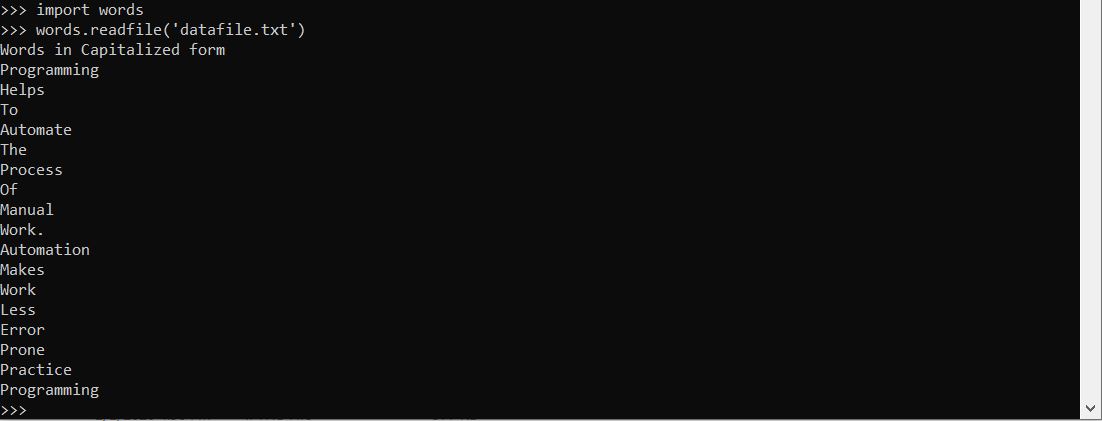
Python module name is same as file name excluding the extension .py , our module name is words as file name is words.py lets import the module and execute it. Module is imported using the import keyword


Download the code from GitHub

Importing the same module times has no effect, once module is imported, to impact any changes made to module after its imported quit python interpreter and import the module on a fresh python interpreter.

Lets create a test module to demonstrate the same. create a file test.py and copy the below code into it

'''
    Module to demonstrate importing same
    module multiple times and its effect
'''
print(__name__) 

we will define __name__ in our next chapter, for now lets execute and see the output.

Code inside module is executed immediately after its imported. When module is imported __name__ is evaluated to module name. Output test is printed only once, Multiple imports of same module has no effect.

Lets execute the module directly and see the output of __name__

Here same __name__ is evaluated to __main__ when executing the module.
This is an important feature of python same __name__ built in type showing different outputs when executing the module vs importing module. __name__ in detailed in our next chapter. 

Functions in Python

A function is a block of code that does a specific task. Large programs are broken to functions to perform a particular task. Functions are executed when it is called with in a program. Functions take input data using arguments and returns a result. Now let us how to define functions and use in python

Functions in python are defined using the 'def' keyword followed by function name and arguments to the function and a colon to start a new block.

def functionName(arguments):

return [expression] is used to return a value from the function.


Python program uses indentation to start a new block. A indentation of 4 spaces is generally used to form the block of statements.

To break from a function use return with no expression, this breaks and exits from the function.


return with no expression returns 'None' , Capture the return of function into a variable and check.

Download the code from GitHub

Python Writing Files

Files are used for reading and writing text and binary data from files. Here will learn how to read, write and manage file resources efficiently. To perform any operation on files the file has to opened first. To open the file we use the built-in python open() function.
open function takes multiple arguments, most commonly used arguments are
file: path to the file to be opened
mode: mode in which the file is to be opened read/write/append and binary/text optional
encoding: Its better to define the encoding of the file, if no encoding is specified python will choose a  default encoding by sys.getdefaultencoding on that machine.

Now lets see how to write data to file using python programming.

 Character Meaning
 'r' Open for reading (default)
 'w' Open for writing, truncating the file if file exists with same name
 'a' Open for writing, append to the end of file if the file exists
 'b' binary mode
 't' text mode (default)

optional modes b,t can be combined with modes r,w,a. so resultant modes might be like 
rb : read binary
wb: write binary
ab : append binary
at  : append text
rt  : read text
wt : write text

fp = open('dummyfile.txt',  mode='wt',  encoding='utf-8')
fp.write('Programming helps to automate the process of manual work.')
fp.write('Automation makes work less error prone.\n')
fp.write('practice programming')
fp.close()

A file pointer fp is created to hold the file object that is opened using the open function, we passed file name, mode of the file and encoding of data in the file. Data is written to the file using the write function. Finally after completion of writing all the required data the file pointer has to be released, this is done by calling close function on the file object.


Number that is displayed after each write function above is the number of bytes that is written to the file.

Download the code from GitHub


Python Reading Files

Files are used for reading and writing text and binary data from files. Here will learn how to read, write and manage file resources efficiently. To perform any operation on files the file has to opened first. To open the file we use the built-in python open() function.
open function takes multiple arguments, most commonly used arguments are
file: path to the file to be opened
mode: mode in which the file is to be opened read/write/append and binary/text
encoding: Its better to define the encoding of the file, if no encoding is specified python will choose a  default encoding by sys.getdefaultencoding on that machine.

Now lets see how to read data from file using python programming.

 Character Meaning
 'r' Open for reading (default)
 'w' Open for writing, truncating the file if file exists with same name
 'a' Open for writing, append to the end of file if the file exists
 'b' binary mode
't' text mode (default)

optional modes b,t can be combined with modes r,w,a. so resultant modes might be like 
rb : read binary
wb: write binary
ab : append binary
at  : append text
rt  : read text
wt : write text

Please read the post Python Writing Files before continuing with reading of file.

fp = open('dummyfile.txt',  mode='rt',  encoding='utf-8')

A file pointer fp is created to hold the file object that is opened using the open function, we passed file name, mode of the file and encoding of data in the file. Here the mode of the file is set to read text.

fp.read() 
read function reads the complete file as a single string. 

Resetting the file pointer to the beginning is done using the seek function. fp.seek(0)

To read only specific number of characters from a file using read function, pass the number of characters to be read to the read function. To read first 10 characters from file use fp.read(10)
After this operation file pointer is advanced to the position to the point it has completed reading. To read the remaining file use fp.read()
fp.read() function returns an empty string on file pointer reaching end of file.

Reading file line by line
To read the file line by line use the python readline function. fp.readline()
fp.readline() function returns an empty string on file pointer reaching end of file.

Reading all lines of file into List
To read all lines of file into a single list use python readlines function. fp.readlines() 
readlines function returns a list of all lines within the file.

Close the file
Finally after completion of writing all the required data the file pointer has to be released, this is done by calling close function on the file object.
fp.close()


Download the code from GitHub


Operations on Python Dictionaries