Showing posts with label __name__. Show all posts

Sunday, October 25, 2020

what is __name__

Python has a special builtin variables which are delimited by double under scores. These variables are evaluated at runtime of python program. We will discuss one such variable here that is __name__ . This variable produces different outputs when module is imported  vs when module is executed directly. This is an important feature of python helps writing the module functionality accordingly.

Here we will be reusing the code written in our Module chapter. Reusing this to demonstrate the functionality.

Paste the code into below module words_name.py


'''
    Module to read a text file and convert each word 
    first letter to CAPS.
'''

def readfile(fileName):
    '''
       Reads input file passed as an agrument process the data
       and prints capitalized words to console.
       Args:
            Takes fileName as an argument
    '''
    fp = open(fileName, mode='rt', encoding='utf-8')
    words = fp.read().split()
    newWords = convertToCaps(words)
    print('Words in Capitalized form')
    for word in newWords:
        print (word)
    fp.close()
    

def convertToCaps(wordsList):
    '''
       Reads input fila passed as an agrument process the data
       and prints capitalized words to console.
       Args:
            Takes wordsList as an argument
       Returns:
            returns wordsList with capitalized letter in each word
    '''
    capitalizedWords = []
    for word in wordsList:
        capitalizedWords.append(word.capitalize())
    return capitalizedWords
    
    
print(__name__) # Using the double under score variable

In the last line of above code we are outputting the value of __name__ variable.

Importing the Module
Here we imported the module, output of the __name__ variable is evaluated to module name words_name

Executing the Module
We executed the module, output of the __name__ variable is evaluated to __main__

Let use this important feature of detection of import vs execution to program our module words_name

Code in the file words_name.py is updated to read file as an argument and process the data in the file when the module is executed. Special variable __name__ is used to determine the execution and corresponding functions to process the data are called.
Code is not executed when the module is imported as the flow does not evaluate special __name__ to __main__

Paste the below code into words_name module or copy the code from GitHub

import sys

'''
    Module to read a text file and convert each word 
    first letter to CAPS.
    
    Execution of module takes a single argument that is 
    file to read and convert.
'''

def readfile(fileName):
    '''
       Reads input file passed as an agrument process the data
       and prints capitalized words to console.
       Args:
            Takes fileName as an argument
    '''
    try:
        fp = open(fileName, mode='rt', encoding='utf-8')
        words = fp.read().split()
        newWords = convertToCaps(words)
        print('Words in Capitalized form')
        for word in newWords:
            print (word)
        fp.close()
    except Excpetion as error:
        print(error)

def convertToCaps(wordsList):
    '''
       Reads input fila passed as an agrument process the data
       and prints capitalized words to console.
       Args:
            Takes wordsList as an argument
       Returns:
            returns wordsList with capitalized letter in each word
    '''
    capitalizedWords = []
    for word in wordsList:
        capitalizedWords.append(word.capitalize())
    return capitalizedWords

def main(inputfile):
    readfile(inputfile)

if(__name__ == '__main__'):
    if (len(sys.argv) < 2):
        print('Module takes file as input provide a file name:')
        exit (0)
    main(sys.argv[1])


Executed the module in the first instance without file, program is requesting to provide file name. In the second instance module is executed with file as input, data is processed and output to console.

Importing the module has no impact

Module words_name is imported and no request for file input or execution of module.
Module in Python

In this chapter you will learn what is module, how to define a custom module, importing custom module in python program and use them.
Lets start by defining a module in python, Module is piece of code that does a specific functionality in programming. All similar functionalities are grouped into source code files called module. 
For Example math module of python, different math functions like Trigonometric functions, logarithmic functions, angular functions, numeric functions, hyperbolic functions are grouped into a single math module.
All python source file use an extension .py lets create a python source file words.py to read data from a file and convert first letter of each word to caps. 
Copy below code to a file and execute

'''
    Module to read a text file and convert each word 
    first letter to CAPS.
'''

def readfile(fileName):
    '''
       Reads input file passed as an agrument process the data
       and prints capitalized words to console.
       Args:
            Takes fileName as an argument
    '''
    fp = open(fileName, mode='rt', encoding='utf-8')
    words = fp.read().split()
    newWords = convertToCaps(words)
    print('Words in Capitalized form')
    for word in newWords:
        print (word)
    fp.close()
    

def convertToCaps(wordsList):
    '''
       Reads input fila passed as an agrument process the data
       and prints capitalized words to console.
       Args:
            Takes wordsList as an argument
       Returns:
            returns wordsList with capitalized letter in each word
    '''
    capitalizedWords = []
    for word in wordsList:
        capitalizedWords.append(word.capitalize())
    return capitalizedWords

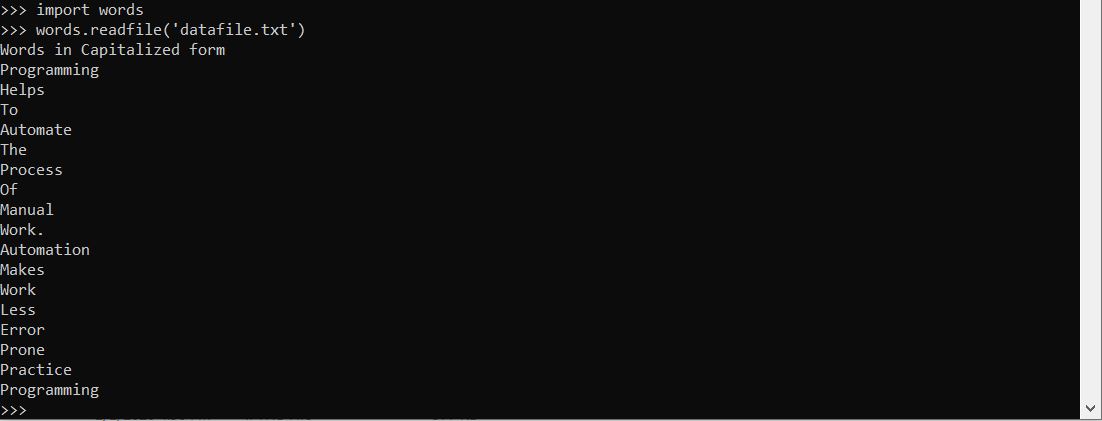
Python module name is same as file name excluding the extension .py , our module name is words as file name is words.py lets import the module and execute it. Module is imported using the import keyword


Download the code from GitHub

Importing the same module times has no effect, once module is imported, to impact any changes made to module after its imported quit python interpreter and import the module on a fresh python interpreter.

Lets create a test module to demonstrate the same. create a file test.py and copy the below code into it

'''
    Module to demonstrate importing same
    module multiple times and its effect
'''
print(__name__) 

we will define __name__ in our next chapter, for now lets execute and see the output.

Code inside module is executed immediately after its imported. When module is imported __name__ is evaluated to module name. Output test is printed only once, Multiple imports of same module has no effect.

Lets execute the module directly and see the output of __name__

Here same __name__ is evaluated to __main__ when executing the module.
This is an important feature of python same __name__ built in type showing different outputs when executing the module vs importing module. __name__ in detailed in our next chapter. 

Operations on Python Dictionaries
